How Are Data Structures Stored in Memory? (2/3): Array, Struct & Linked List
Array, Struct & Linked List
In the previous section, I talked about how memory works. If you don't know what pointers are, I recommend reading that section first.
As you know, there are many different data structures (Tree, Map, Trie, Queue, Stack, Graph…), and the way these structures are stored in memory actually relies on 3 basic data structures: Array, Struct and Linked List. Today we will examine these data structures. We will look at the complexity of the operations they perform.
Throughout this blog I used C for the examples, but I don't think there is a major difference in other languages.
Array
Arrays keep their elements one after another in memory. For example, let's imagine an integer array.
If addresses 1024–1028 in memory are allocated for the first element, addresses 1028–1032 are allocated for the second element, and it continues this way for each element. An equal amount of space is allocated for every element.
We need to specify in advance how many elements this array will have, but in high-level languages this is done automatically.
The most important advantage of arrays is that they can reach the value at the index you specify in O(1) complexity. The reason is that they can know at which memory address the value at any index is stored.
size * index + address of the first element
Now, do you understand why we write array[0] for the first element of an array?
To prove what we have described, let me show you an interesting example. Carefully examine the C code below.
#include <stdio.h>
int main() {
  char *arr = {'a', 'b', 'c', 'd'}
  char first = 0[arr];
  printf("%d\n", first);
}

> a
Above, we are actually doing the operation we always do, in reverse.
Instead of taking index 0 of the array at address arr (arr[0]),
we take the value at index 'arr' of the array at address 0 (0[arr]).
In the previous section, I prepared some code to practically show how arrays work. You can access that code from this Replit page and observe arrays in memory.
Multidimensional Array
Multidimensional arrays are actually arrays that hold arrays. A 2-dimensional array holds one-dimensional arrays. In other words, it actually holds addresses.
The complexity of multidimensional arrays is O(m), where m is the number of dimensions. However, since the number of dimensions usually stays constant, it can be considered O(1).
Struct
Structs (also known as Record and Tuple) are a data structure that lets you keep several data types together. Unlike objects, their only purpose is to hold data.
A struct keeps its data one after another, just like arrays, and when you want to access a field, it finds that field's location in memory in O(1) complexity based on its order within the struct.
struct person {
 int age;    // 0-4 byte
 char *name; // 4-12 byte
};

person.age = 1;
person.name = "Hamza";
They hold data just like arrays. That's why if you create an array and cast it to a struct, you actually get a struct:
struct person anyperson = (struct person) {19, "Ali"}Now let's examine how structs look in memory. First, let's find out how much space int, char, a char pointer and our person struct take up in memory, using the sizeof operator.
#include <stdio.h>

int main() {
 printf("sizeof(int):       %lu\n", sizeof(int));
 printf("sizeof(char):      %lu\n", sizeof(char));
 printf("sizeof(char *):    %lu\n", sizeof(char *));
 printf("sizeof(person):    %lu\n", sizeof(struct person));
}

> gcc test.c && ./a.out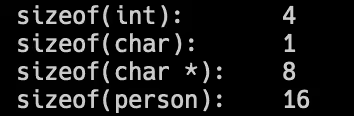
As you can see, our struct holds an integer (4 bytes) and a char pointer (8 bytes). However, it takes up 16 bytes in memory. So what are the remaining 4 bytes allocated for?
To understand this, let's debug our code. I'm using the memory debug code I shared in the previous section.
#include "memory_debugger.h"
#include <stdio.h>

struct person {
 int age;
 char *name;
};

int main() {
 struct person hamza = { 20, "hamza" };
 printf("age address:       %p\n", &hamza.age);
 printf("name address:      %p\n", &hamza.name);
 printf("hamza address:     %p\n", &hamza);
 printf("name pointer val.: %p\n", hamza.name);
 print_memory(&hamza, 16);
}

> gcc test.c memory_debugger.c && ./a.out
These 4 bytes are actually not allocated for any data. If we added another 4-byte data type to our struct, it would still take up 16 bytes.
The purpose of this gap is memory alignment (aligning). I won't go into this topic in detail today, but simply put, processors handle the information in memory in chunks of 4 or 8 bytes (this is where 32-bit and 64-bit come from). When you ask for address 17, the CPU actually fetches the bytes between 16 and 24. Unaligned data can sit right between 2 memory blocks and needlessly force the processor to read 2 separate blocks. That's why keeping all data aligned is important for performance.
struct person {
 int age;
 char *name;
};

struct person {
 char age;
 char *name;
};

struct person {
 int age;
 int height;
 char *name;
};
All 3 of these structs take up 16 bytes in memory (on 64-bit computers).
Linked List
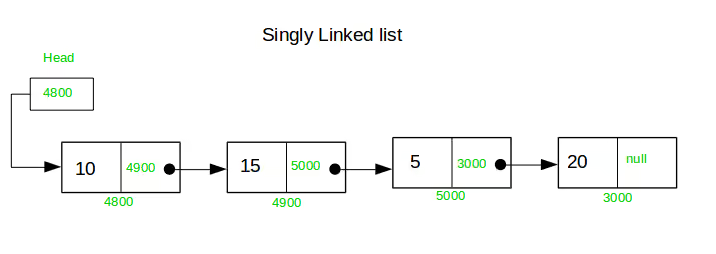 Representative illustration of the Linked List structure.
A Linked List consists of nodes, each pointing to the one after it. In object-oriented programming these nodes can be objects. In our case, they are structs. Each struct holds at least one piece of data and the address of the node that comes after it.
struct node {
 int data;
 struct node *next;
};
Now let's create a Linked List with 5 elements and debug the memory.
#include "memory_debugger.h"
#include <stdio.h>

struct node {
 int data;
 struct node *next;
};

int main() {
 struct node fiveth = {1, NULL};
 struct node fourth = {2, &fiveth};
 struct node third = {3, &fourth};
 struct node second = {4, &third};
 struct node first = {5, &second};
 printf("first: %p\nsecond: %p\nthird: %p\nfourth: %p\nfiveth: %p\n", &first, &second, &third, &fourth, &fiveth);
 printf("sizeof(struct node): %lu\n", sizeof(struct node));
 print_memory(&first, sizeof(struct node) * 5 + 20);
}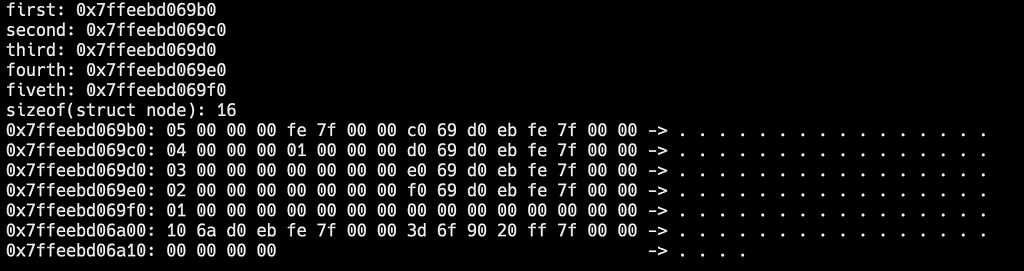
In this example, 5 structs, each taking up 16 bytes, were allocated in different regions of memory. Since they are in an isolated environment, they sit right next to each other in memory, but they don't have to end up this way.

As you can see, memory alignment exists here too. If you look carefully, the values in the next part are the same as the addresses on the left. So we can see that we created nodes that point to each other.
Linked Lists have O(n) complexity when reading. If you are going to search a large data set, you may suffer. However, since these structures depend on each other very little, they can be stretched easily. They don't have to have a fixed memory size. They grow as new nodes are added.
When you want to insert a new node at any point, only the node before it in the list is affected. Therefore the data can be manipulated very easily. If you wanted to do the same with arrays, at best you would have to shift all the data after the point you inserted at. However, on modern CPUs this shifting is so fast, and arrays are so cache-friendly, that arrays usually beat Linked Lists at writes too. So unless you have a very good reason to use a Linked List, always prefer an array.
You might ask: why discuss Linked Lists at all if they're practically useless?
Because understanding Linked Lists unlocks incredible new data structures for us. Thanks to them, we can build Search Trees, and these trees let us index databases so we can search numerical data with very low complexity, like log(n).
We have reached the end of this section. Before leaving, let me share a table showing the complexities of data structures in Java. The information below doesn't change much from system to system.
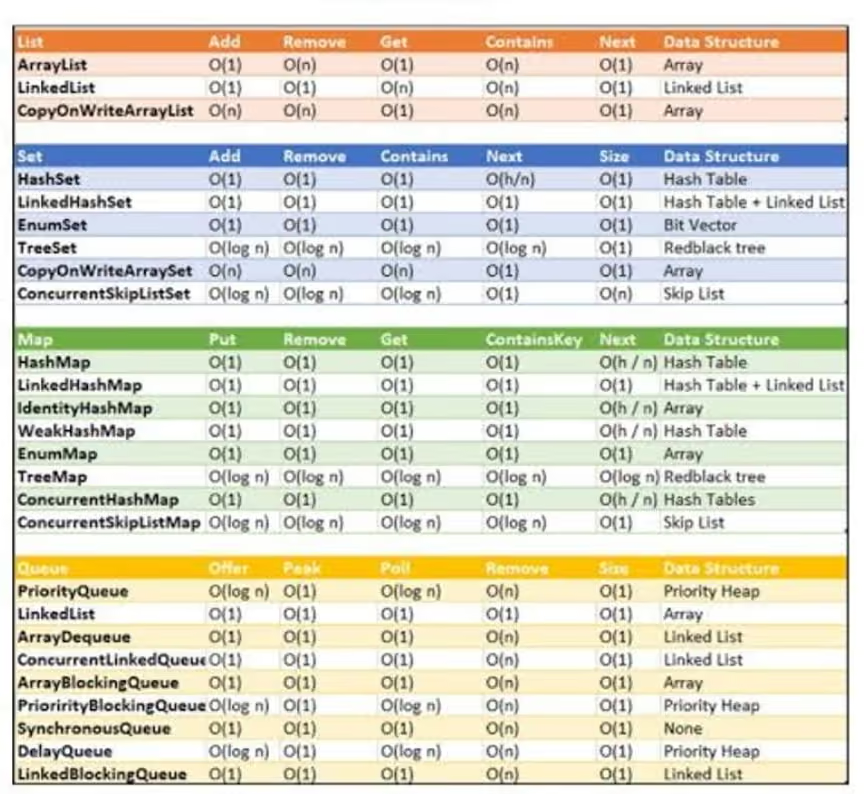 Time complexities of Java's data structures and their operations.
In the next section, I will talk about hash functions, which let us express any kind of data as a number and allow us to read in O(1) complexity, and about trees. I hope this was a useful post.