How does memory work? What is a pointer?
Data structures are among the most fundamental building blocks of software. From machine learning to embedded software, wherever software exists, data structures exist. Since that is the case, shouldn’t we learn them deeply? No matter which language you write, knowing that language’s internals well is always important.
In this blog, I will talk about how memory works and how computers save data structures in memory. This section will be only about memory. In the other sections, we will also examine other data structures, especially Linked Lists, Arrays, and HashSets.
How does memory work?
If you have coded in languages like C, C++, or Go, you are already familiar with pointers. In this section, I will explain only pointers.
Memory keeps data in a one-dimensional structure. It gives each byte an address. This address simply indicates which byte of memory it is. As an example, let’s assign the value "hello" to a variable called foo and see what happens.
string foo = "hello";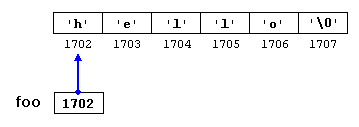 Memory appearance of the text "hello".
When you do this, a contiguous 6-byte region is allocated in memory. The first 5 of those bytes store 'h', 'e', 'l', 'l', 'o'. The last byte stores a null character. The reason is that the computer needs a mechanism to understand how long a string is. In other words, you must tell the computer where in memory to read and how many bytes to read.
In the memory region above, the number written under each byte is that byte’s address. When the computer wants to access this string, it uses the address of the first character ('h') (1702). So you can actually think of foo’s value as 1702.
When you want to read this string, the computer goes to this address (1702). It reads that byte, then reads the next byte (1703), and continues this way. If the byte it reads is a null character, then it understands it reached the end of the text and stops. Let’s examine this a bit with examples.
Pseudocode implementations
Below, I shared some sample code so you can understand this system better. Before getting into code, I need to mention one small thing. For convenient explanation, we say the sample address is 1702, but in practical use these numbers are very large. So large that even in hexadecimal they are around 9-digit numbers. Therefore we cannot keep address values in an integer type. Also, since these numbers cannot be negative (there is no -1 address in memory), we can keep them in an unsigned type.
So for now, there is no harm in thinking of addresses as unsigned long long. Now let’s print our "hello" text to the screen.
Please remember that the code below does not belong to any specific programming language and was written only to convey the core idea.
Using a loop:
print_string() {
  unsigned long long address = "hello"; //1702
  int i = 0;
  while (true) {
    char byte = get_byte_at(address + i);
    if (byte == '\0')
      break;
    print(byte);
    i++;
  }
}
Recursively:
print_string(unsigned long long address) { //1702
 char byte = get_byte_at(address);
 if (byte == '\0')
    return;
  print(byte);
  print_string(address + 1);
}
When you want to read an integer, the computer knows that value is 4 bytes, so it reads 4 bytes and stops. The same applies to other numeric types. So null-termination is mostly a situation seen only with strings.
There is one more thing you should know here. What we call a byte is an 8-digit number in binary. So it is nothing more than a number between 0 and 255. When we write characters in a string expression, we actually write their numeric equivalents from the ASCII table. For example, when you want to write the letter 'a', you are actually writing 97.
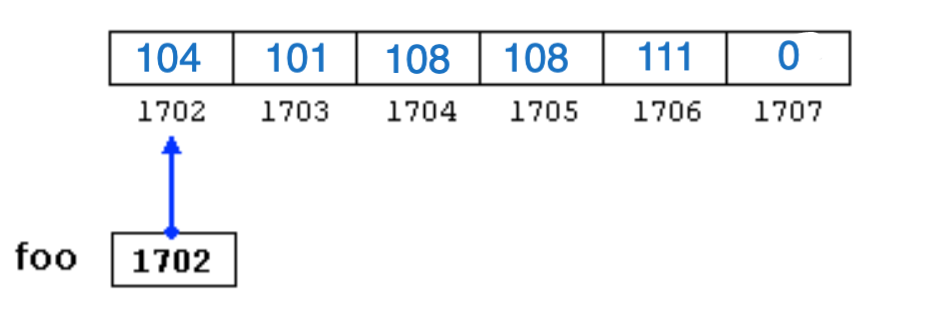 Numeric memory view of the text "hello".
When a letter is mentioned, remember that it is actually a number. When a string is mentioned, know that it is an address, and every address is also a number.
When you assign 97 to an integer, because integers need 4 bytes, the computer writes 0 to the first three bytes and 97 to the last byte. (Can vary from system to system. See: Endianness)
When you assign 'a' to a char, it writes 97 to one byte.
For computers, everything is a number. The only difference is how you choose to interpret it.
What is a pointer?
As I mentioned above, addresses in memory are stored and used as numbers. Variables that hold these numbers are called pointers.
Programming languages have special types for pointers. If a variable stores the address of a byte, this means it is a pointer. If the data at the address held by this variable is of type char, we call it a char pointer (char *). For example, the variable foo is a char pointer. Because at the address where its value points (1702) there is a char ('h'). Same for integers: we call them int pointers (int *). If there is also an address at the held address, then we look at the data that address points to, and for example if it is char, we call it char **, and this continues.
To get the address of a variable, put '&' at the front. To go to an address, put '*' at the front of the pointer that stores the address.
char c;  // allocates 1 byte in memory (assume address is 3201)
c = 'a'; // writes 97 ('a') there

char *pointer_c; // allocates 8 bytes in memory
pointer_c = &c;  // writes 3201 there

char another_c; // allocates 1 byte in memory
another_c = *pointer_c; /* goes to address 3201, finds value 97,
                           assigns this value to another_c */
In the implementations above, since we had not yet learned what pointers are, I made up a function called get_byte_at. Here is the implementation of that function:
char get_byte_at(char *addr) { // when we pass 1702 (foo's value),
  return *addr; // returns 104 ('h')
}
Memory View
Since each byte in memory holds a value between 0 and 256, we can represent these values as 2-digit numbers in hexadecimal. Most of the time, when debugging memory, tools are used that show each byte in hexadecimal.
 Memory view feature of CLion IDE.
In the interface above, the real addresses of bytes are written on the left. As you can see, the address we assumed as 1702 corresponds to huge numbers in the practical world.
In the middle section, the hexadecimal numeric equivalents of each byte are written. For example in hexadecimal:
0x00007ffeecf07910 byte has value d0 (208)
0x00007ffeecf07911 byte has value 79 (121)
In the right section, the ASCII equivalents of these bytes are written. The problem is that not every ASCII character is printable. So non-printable ones are shown as .. Thanks to this section, we can easily understand strings in memory.
To understand how memory looks, I wrote a small memory debugger code in C. To try it, you can visit this Memory Debugger page.
We have reached the end of this article. I hope you now have an idea about how memory works, how data is stored, and what pointers are. In the next sections, we will write implementations of data structures and observe what changes in memory.