What’s really going on under the hood when you use the ping?
1. What is the difference between typical TCP and ping requests (Linux)?
2. Why doesn’t ping need a port?
3. Why can you connect to a host but not ping it?
4. How does traceroute know the path your packet took?
5. If ICMP and IP are both in Layer 3, how is ICMP wrapped by IP?
This is not AI content. So, there is no gaslighting here.
You’ll understand every question. Don’t rush.
Ping is a command-line utility for Linux to test the reachability of a host. Basically, it sends debug packets to a specific host and typically causes the target host to send a response (also known as ‘pong’) back. If you receive a response, it means the network path between you and the host works properly.
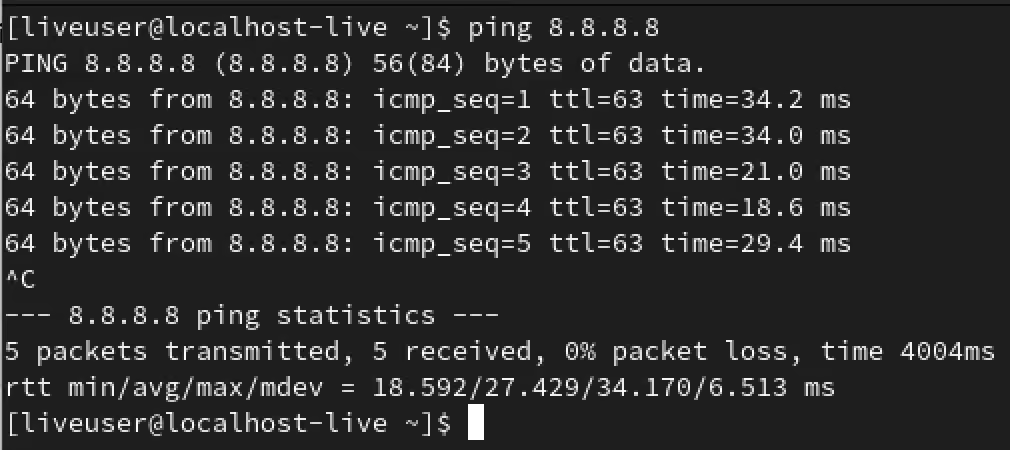 Typical ping command output
The debug protocol: ICMP
The debug packets I mentioned earlier are Internet Control Message Protocol (ICMP) packets. ICMP is a special debug protocol to test network devices. Here is what it contains:
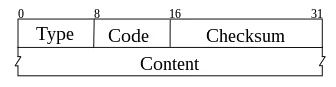 Structure of ICMP packets
The first 8 bits of ICMP packets represent the subject of the packet. There are many but we are interested in only two of them: Echo Request(used for ping), Echo Reply(used for pong).
The property ‘code’ is not important for our case but you can think of it as a variety of the type property.
The checksum property is used to guarantee the entire packet is transmitted without corruption. There is a specific algorithm to generate this checksum. During the generation of this checksum it is set to zero (due to the chicken-and-egg problem).
The property ‘content’ contains nothing mandatory in our case. Typically, it contains the timestamp of the sent ping. However, technically the allocated content part is not standard. It may be too short. In this case it can be ignored. Also, if the content part is too long, usually it is filled by zero bytes or sequential bytes like: 00,01,02,03…FF,00…
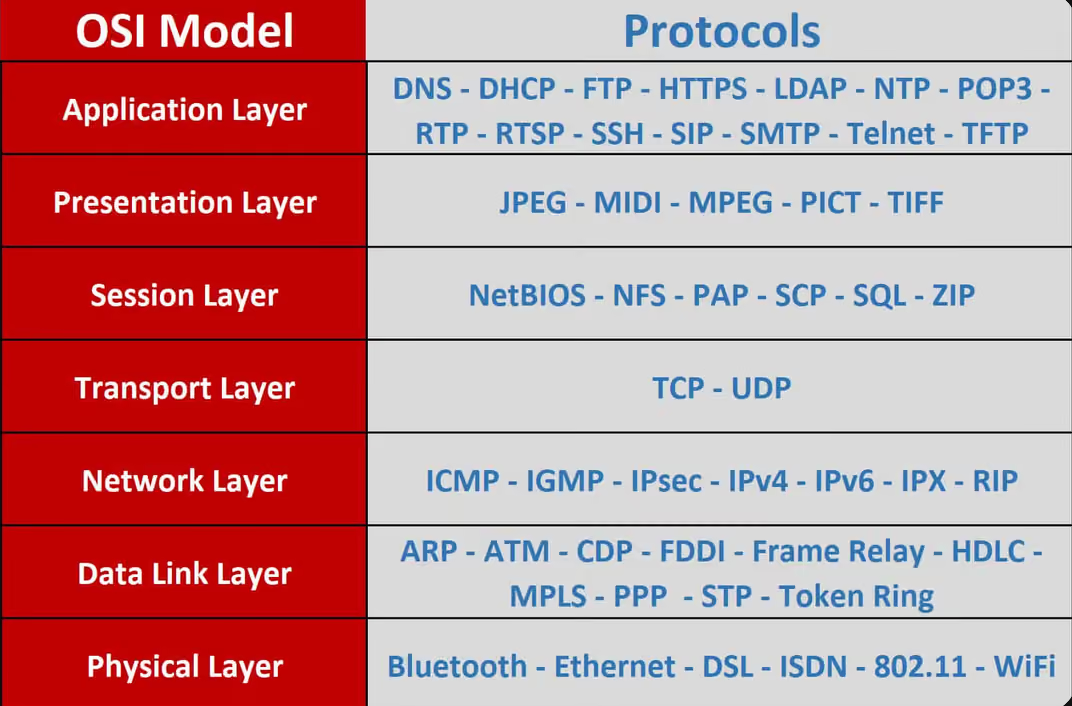 The famous OSI model and protocols where they sit.
How is it possible that ICMP and IPv4 sit on the same layer?
You may sense that the ICMP is an internet protocol because it is Internet Control Message Protocol. Also we’ve seen above that the ICMP header doesn’t contain any IP address. Yet both are classified as Layer 3 protocols. Then they cannot depend on each other, right? Actually, no.
The word ‘layer’ represents a group of protocols, not exact levels. ICMP is on top of IP and both are in Layer 3. In other words, ICMP is encapsulated by IP.
Why doesn’t ping need a port?
According to the OSI layers we discussed above, the port concept is introduced by TCP and UDP protocols. The objective of IP protocol is reaching the correct computer. A port is meaningful only when you have a computer. In other words, IP’s job ends where the port’s job starts.
ICMP was created to debug network issues between computers, not applications. It also allows us to test the network without running new applications to listen. That is why it doesn’t need ports.
Why can you connect to a host but not ping it?
Firewalls. Firewalls do not like ICMP. They usually block ICMP packets to make scanning harder.
How does traceroute know the path your packet took?
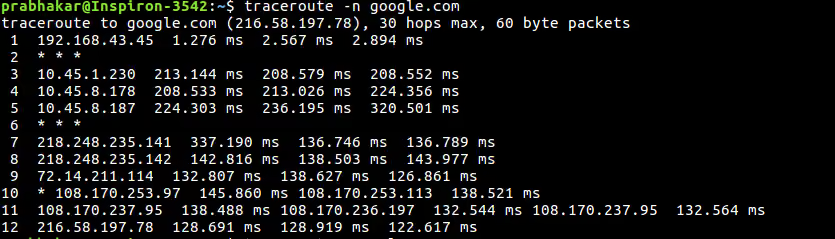 Typical traceroute command output.
Traceroute is a command-line utility for Linux to see paths where your ping requests visit during the transmission.
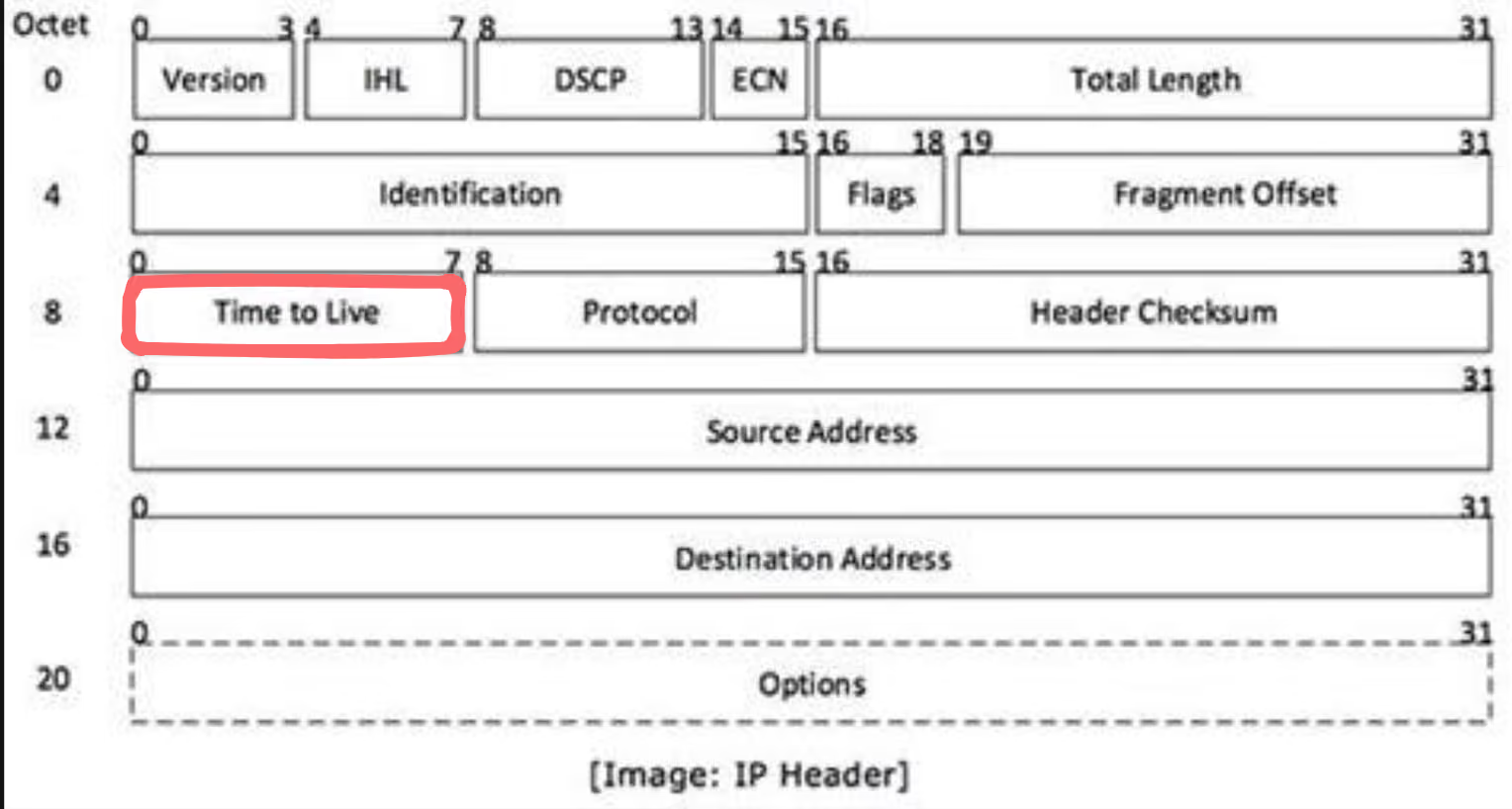 Structure of IPv4 packets.
IPv4 packets have a mechanism called ‘Time to Live’. This mechanism(and a little bit magic) unlocks tracking where our ping packet goes.
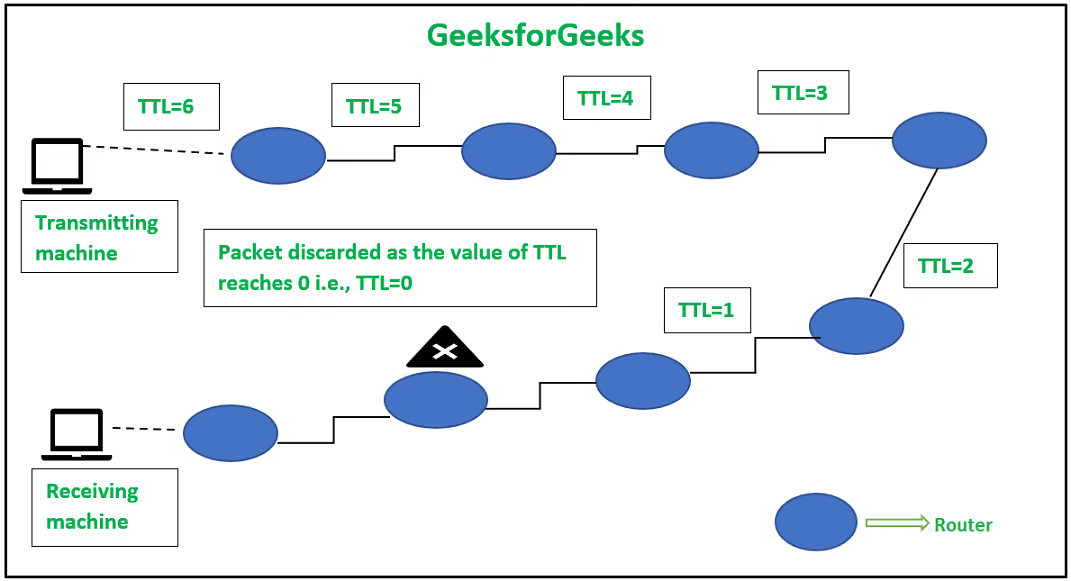 How TTL works.
When an IP packet is sent, our packet goes to the target machine thanks to routers. Each router takes our packet and forwards it to the next appropriate router. Before the router forwards IP packets, it decreases the TTL of the packet by 1. If the TTL is 1 and the destination is not reached, the router doesn’t forward it further.
So we can tell the network devices to stop forwarding earlier than usual. The crucial part is: the routers do not drop these TTL expired packets. They respond as ‘time exceeded’. When the response comes you see the router as the sender in the response packet.
Basically, traceroute is a program that sends ping packets to the same destination with various TTLs. So we receive responses from all routers in the path. However if a machine does not like ICMP packets (firewall), it may choose silence. This is why some lines are “* * *” in the traceroute outputs.
For Linux view, what is the difference between typical TCP/UDP packets and ping?
The ping utility sends an ICMP Echo Request to the target. Every ’64 bytes from 8.8.8.8: blah blah’ line represents a distinct Request/Response pair.
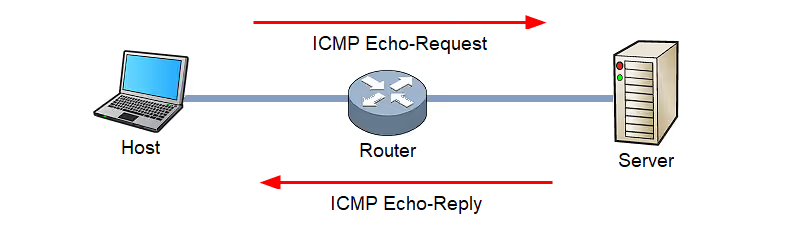
In typical TCP/UDP communication, a received packet gets parsed and delivered to a user-space application. This delivery is done via network sockets. They act as a bridge between kernel-space and user-space to allow applications to handle network payloads. You can think of network sockets as special files (but this is not exactly what they are). The kernel writes the payloads to this file and applications read from it. This reading and writing step can be done by using the same system call as in the case of reading files in the filesystem.
I want to talk more about sockets. Think of servers we use everywhere: Nginx, NodeJS servers, DotNet micro-service applications… It doesn’t matter which one you use. In Linux, when you run any kind of process that listens for TCP, your application definitely uses these system calls: socket(), bind(), listen(). To consolidate our understanding we need to know which parameters these system calls depend on. I don’t want to go off-topic so we’ll inspect only bind().
int bind(int sockfd, const struct sockaddr *addr, socklen_t addrlen);The system call bind() needs 3 parameters. The first one is the file descriptor of the socket. If you don’t know file descriptors you can think of them as file IDs.
The second parameter is a config for the binding operation. The third parameter is needed for memory management. We ignore it.
The sockaddr struct is not a concrete implementation of struct. This is a kind of polymorphism in C. I mean, if you go to the definition of sockaddr, you won’t find anything useful. This is an abstract type to merge IPv6 and IPv4 configs. Okay maybe I am over-explaining now. I just want to explain to you why we should look for the struct named ‘sockaddr_in’ (IPv4) not for sockaddr.
 struct sockaddr_in {
     sa_family_t     sin_family;     /* IPv4 */
     in_port_t       sin_port;       /* Port */
     struct in_addr  sin_addr;       /* IP address */
 };
This is how a regular user-space application listens to the network. However typical ICMP packets are not handled by user-space for the receiver. They are replied to by the kernel. This is the key difference between requests that go to your web server and ping packets.